က်ေနာ္ရွာသမွ် သုံးသမွ်ေလးေတြကို တစ္ျခား၀ါသနာတူေတြ လိုအပ္သူေတြ ျပန္သုံးႏိုင္ေအာင္ တတ္ႏိုင္သေလာက္ share ေပးျခင္းပါ။ တစ္ခ်ိဳ႕ဖိုင္ေတြက က်ေနာ္ကိုယ္တိုင္ တင္ေပးသလို တစ္ခ်ိဳ႕ေတြကိုေတာ့ တစ္ျခားကေန credit ေပးၿပီးျပန္shareေပးတာပါ။ တစ္ခ်ိဳ႕ဖိုင္ဆိုဒ္ႀကီးတာေတြကိုေတာ့ မူရင္းlink ကိုပဲ ျပန္ညႊန္းေပးပါတယ္။

Read more

Showing posts with label Photo Editing. Show all posts

Thursday, February 6, 2014

0

BaldBooth

BaldBooth 
ေျပာင္ခ်င္ေနာက္ခ်င္သူူေတြအတြက္ အရမ္း good တဲ့ apk ေလးပါ
ပံုကိုၾကည့္တာနဲသိတယ္ေနာ္
ကိုယ္ေဘာ္ဒါေတြကို ပံုလွလွေလးျပင္ေပးလိုက္ေတာ့ ““ဟိိဟိဟိ
BaldBooth
BaldBooth 
 BaldBooth


DOWNLOAD>>>>> LINK 1/ LINK 2  
 
credit>>>linkabartechnology

Tuesday, February 4, 2014

0


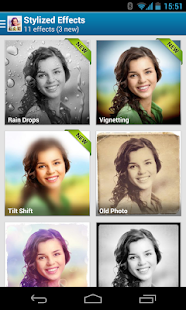
Android phone ႏွင့္ Tablet ေတြအတြက္ ပံုေတြကို Edit လုပ္ဖို႕ တကယ္ေကာင္းတဲ့ ေဆာ့၀ဲလ္ေလးျဖစ္ ပါတယ္။ အရမ္းကို လွပတဲ့ Frame ေတြ Effect ေပါင္း 520 ေက်ာ္ ပါ၀င္ျပီး အရမ္း ဆန္းတဲ့ Effect ေတြ စံုလင္စြာ ပါ၀င္ပါတယ္။ Filter မ်ားလဲ တကယ္ကို ျပည့္စံုစြာပါျပီး တျခား ေသာ Photo Editter ေတြထက္ ပိုျပီး လြယ္ကူပါတယ္။

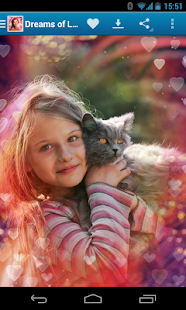
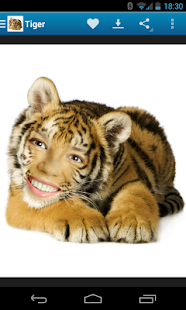
ေအာက္မွာ Screenshoot ေတြပါ တင္ေပးထားပါတယ္။ ဖုန္းနဲ႕ ပံုျပင္ရတာ ၀ါဒနာပါတဲ့ သူငယ္ခ်င္းေတြ အတြက္ တကယ္ကို အသံုး၀င္ေစမွာပါ။ Playstore မွာဆိုရင္ US$3.99 ေပး၀ယ္ရပါတယ္။ အခု က်ေနာ့္ဆိုဒ္မွာ Free ေဒါင္းယူနိုင္ပါတယ္။ v2.0.82 ကို တင္ေပးလိုက္တာပါ။
Andriod ဖုန္း အားလံုးမွာ အသံုးျပဳနိုင္ပါတယ္။ စိတ္၀င္စားရင္ ေအာက္ကလင့္မွာ ေဒါင္းယူနိုင္ပါျပီ။

App Screenshots
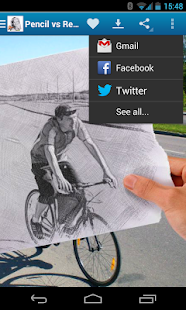
Pho.to Lab PRO - photo editor - screenshot thumbnailPho.to Lab PRO - photo editor - screenshot thumbnailPho.to Lab PRO - photo editor - screenshot thumbnailPho.to Lab PRO - photo editor - screenshot thumbnail 
အားလံုးအဆင္ေျပပါေစ.......။

Monday, February 3, 2014

0

Android သံုးထားတဲ့ Device ထဲမွာ ဓါတ္ပံုေတြကို လွလွပပေလး ျပင္လို႔ေကာင္းတဲ့ App ေလးပါ...


-
Install PicsArt Photo Studio – where everyone becomes a great artist! It is the most popular free mobile photo editor with over 87,000,000 installs, one of the fastest growing photo artists’ social networks and largest galleries of artwork.

PicsArt is a free photo editor, photo grid and collage maker, drawing tool and picture art network. It is like an all-in-one collection of multiple editors:

PicsArt Collage Maker allows to create amazing collages, using photo grid, free form collage maker, or using photos on backgrounds. It is one of the most powerful photo grid and free-form collage making tools on the market.

PicsArt Photo Editor provides tons of photo manipulations, masks, collages, frames, borders, stickers, text effects, clipart graphics, overlays, callouts, crop, rotate, color adjust and more!

PicsArt Effects are awesome artistic photo effects such as a stenciler, cartoonizer, sketcher, Orton, Lomo, vintage, cross process, HDR, fattal, pencil, Holgaart, watercolor, contours, comic, neon, gouache, old paper, pastel, red eye remover, Popart, mirror, smart blur, face fix, color splash, paper effect and more! It allows you to apply effects to picture using brush mode, when artists can control where and how much of the effect to apply to an image.

Photo Editor provides multiple image masks, text tools, cliparts, lens flare, frames and stencils to artists and graphic designers. Both novice and professional graphic designers are using PicsArt for work and fun!

PicsArt Photo Camera enables you to take a picture, preview and apply photo live effects by enhancing your standard camera.

PicsArt Drawing Tool provides fantastic image drawing features including: draw, sticker mode, callouts, artistic brushes, layers and text styles! You can make fun pictures drawing on your Facebook friend’s photos! PicsArt Draw includes layers and the ability to hide, rearrange order, or merge image layers.
The new PicsArt DrawCam feature allows you to combine live camera with drawing, photo editing and layers.

What’s New
v3.16.0
- Recent section is back
- Bug fixes

အဆင္ေျပပါေစ.. credit>>>> ေမာင္ေပါက္< Knowledge Note >

Download Link 1
Download Link

Tuesday, December 17, 2013

0

Capture.png
Introduction:
Photo Painter is an Interactive photo editing tool inspired by artist with different painting styles, image filters, frames, textures, and more! The full version contains

★ Create painting from photos
★ 9 fantastic painting styles, realism, impressionism, expressionism, and more.
★ Different textures include oil paint, color wash and sketch.
★ Finger touch to draw, paint, doodle
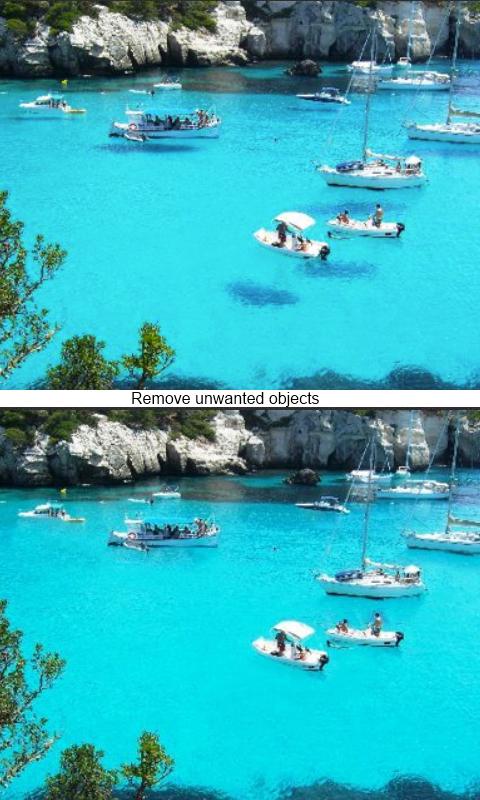
★ Seamless remove objects from photos (touchretouch)!
★ 15 cool image filters and color effects for pictures
★ 4 different frames
★ 4 special textures
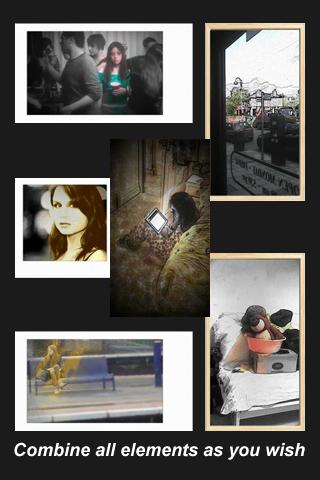
★ Photo collage to combine your artworks
★ A intuitive way to combine all these elements
★ A powerful finger draw function
★ Addictive finger control
★ No advertisement ever
★ Continuous development more to come


USES:
This app’s primary use is as a creative photo editing tool. It is easy to use and remembers your preference. This app is good for creating amazing photos with its build in image filters and frames. Additionally, this app is ideal for artist and designer, allowing them to visualize different painting effects of the scene in real-time using non-photorealistic rendering. Painting is as simple as playing games in this app.


ADDITIONAL FEATURES:

convert photo to paint with real time painting process
easy to use and intuitive fingure control
can adjust texture details
complete interactive user guide
brushes designed for fat finger and small screen
effects with real time preview in grid view
freedom to combine and mixture everything
auto orientation of the buttons
zoom in zoom out of the photo
direct access from gallery
easy share to social networks
large draw area with no advertisement
small just 1.5MB
install on SD card

HOW TO USE:
The user can load image from gallery or take a picture in the main page. On first use, there will be a complete tutorial with flashing buttons and animated gestures to guide the user. User can start the Photo Painter from gallery using share button directly. Images can be saved to the SD card or shared to Facebook, WeChat, MoMo easily in the option menu.

:: Useful Tips For Downloading ::
Download Link ကို ႏွိပ္ၾကည့္လို႔ MiloShare : File Hosting လင္႔ထြက္မလာလွ်င္ Download Link ကို Open In New Tap ဖြင္႔ျပီး Download ျပဳလုပ္ပါ..
ထို႔ေနာက္ 5 Sec မွ် ေစာင္႔ ျပီး ညာဖက္ အေပၚေထာင္႔မွာ Skip AD ဆိုသည္ကို ႏွိပ္ျပီး Download Page ကိုေရာက္ေအာင္သြားပါ...
Download Page တြင္ Start Download ကိုႏွိပ္ျပီး ေဒါင္းပါ.. Android အတြက္ ADM ,  PC အတြက္ IDM တို႔ ရွိက အဆင္ေျပသည္။။
credit>>amyokaungtarr


Download

Photo Painter - screenshotPhoto Painter - screenshot 
 

Saturday, December 14, 2013

0

ခုေခတ္မွာ ဖုန္းကို PC တစ္လံုးလိုအသံုးျပဳခ်င္လာၾကပါတယ္.. အရင္က ဓါတ္ပံုျပင္တယ္ဆိုတာ PC မွာပဲ ရခဲ့ေပမယ့္ ခုေတာ့ Android Smart Phone တစ္လံုးမွာ ေကာင္းေကာင္း ျပင္ႏိုင္လာပါၿပီ. PhotoSuite 3 Photo Editor ကေတာ့ Android ထဲမွာ ဓါတ္ပံုျပင္တဲ့ App ထဲမွာ Photoshop ကို ေက်ာ္လြန္ၿပီး လူႀကိဳက္မ်ားလာခဲ့တဲ့ app ျဖစ္ပါတယ္..
Function နဲ႔ Tool ေတြစံုလင္ၿပီး ေကာင္းမြန္ျပည့္စံုတဲ့ ဓါတ္ပံုတစ္ခု ဖန္တီးႏိုင္ပါတယ္. ဗားရွင္း 3.0.70 ကေတာ့ ဒီဇင္ဘာ 11 ရက္ေန႔က Update ထြက္ရွိလာၿပီး GooglePlay မွာ 2.99 ေဒၚလာက်သင့္မွာျဖစ္ၿပီးဒီမွာေတာ့ Free ေပါ့ဗ်ာ..


PhotoSuite is a photo studio app with wide-ranging capabilities. From Photoshop essentials such as picture editing fun effects, combining of pictures, picture collages and sketching pictures to advanced photo art tools such as working with layers and masks as well as complex selection of objects – PhotoSuite allows you to create astonishing images. Share results with your friends and family in social networks, your cloud storage or via email.

Features:
Improve your photos - crop photos, apply fine tone and color changes to get the best of your photos.
Use advanced photo designer tools – work with layers to combine pictures and create work-of- art collages.
Enhance your images with graphical text and free drawing.
Work with picture filters and effects - Invert , Grayscale, Pointillize, Crystallize, Exposure, Posterize, Diffuse, Contrast, Displace, Kaleidoscope, Marble, Ripple, Block, Weave, Oil, Reduce noise, Sharpen, Edge.
File formats – PhotoSuite works in its own native format but can open and export images to the commonly used PNG, JPEG and gs formats.
Use comprehensive selection tools and grouping of objects to quickly and easily handle parts of your image.
Take advantage of your device camera to capture photos and include them in your image projects.
Share images – PhotoSuite allows you to share images with your family and friends – in social networks such as Facebook, Google +, Picassa or Twitter; in your cloud accounts like Dropbox (via their third party applications); as email attachments.

What's in this version : (Updated : Dec 11, 2013)
Histogram support added.
Magnetic transformation – ability to align layers and selections to work area border.
Screen blend mode introduced.
Reset transformation introduced.
Flip and Rotate transformations via layer or selection dragging.
Real time preview of “Hand” tool applied to layers, masks or whole projects.
Real-time preview of Opacity and Adjustments.
Required Android O/S : 2.2+

Buy in GooglePlay
credit >>>kopauk

အဆင္ေျပပါေစ..


Download

Blogger Tips and TricksLatest Tips And TricksBlogger Tricks

Popular Posts

How to download

How to download